Mender blog

Keep deployments and inventory responsive on the devices used for active development and testing.
Highlights | Accepted devices can now be marked as test devices using the new server-side test_device attribute. Test devices can poll for updates and publish inventory as frequently as needed, independent of standard polling rate limits. All devices in trial tenants are test devices by default.
Hosted Mender is soon introducing rate limiting for how often devices check for updates and report inventory. However, to facilitate fast, iterative work, such as testing new code in a CI/CD pipeline or evaluating Mender, up to 10 devices per tenant can be designated as test devices, which are exempt from the standard rate limits.
Note: New rate limits for update checks and inventory polls are not yet in effect on hosted Mender; all customers will be notified well before the new rate limits take effect. However, it is recommended to start designating test devices now, so that any development and CI/CD workflows are not affected when the new rate limits are enforced.
What is changing: Polling rate limits on hosted Mender
On hosted Mender, for production devices, the default intervals are typically sufficient. A device that checks for updates or reports inventory more frequently than the default interval for its device tier is considered excessive use, and requests exceeding the limit will soon be rate limited. This will help ensure the stability and fair use of hosted Mender for all customers.
|
Device tier |
Update checks |
Inventory updates |
|
Standard |
30 minutes |
8 hours |
|
Micro |
7 days |
7 days |
In practice, the coming rate limits mean that a Standard-tier device can take up to 30 minutes after the deployment to update to the new version, and new inventory can take up to 8 hours to appear.
Using test devices in hosted Mender
A test device is an accepted device exempt from update check and inventory poll rate limiting. Typical test devices are:
- Testing new code on real hardware as part of a CI/CD system
- Trying out Mender features, for example, during a trial
test_device is a reserved system attribute, managed by the Mender Server rather than reported by the device. Because the designation is stored on the server, it does not require any change to the Mender Client on the device.
Designating a test device
In the device list, select a device and use Device actions → Set as test device.
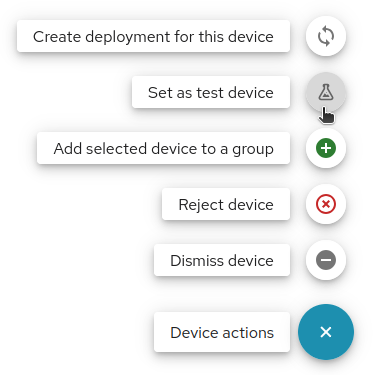
The default value of test_device for a given device depends on the tenant:
- Trial tenants: test_device defaults to true, so devices behave responsively while evaluating Mender capabilities.
- Upgrading from a trial to a paid plan: All devices carried over from the trial remain test devices, and the designation can be explicitly removed after upgrading.
- Existing paid plans and other tenants: test_device defaults to false.
Finding and identifying test devices
Since test_device is stored as a device attribute, you can filter on it like any other attribute:
- All test devices: test_device equals true
- All devices that are not test devices: test_device does not equal true
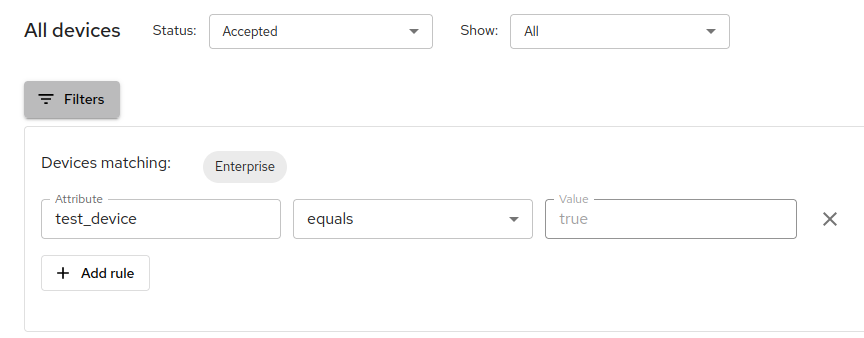
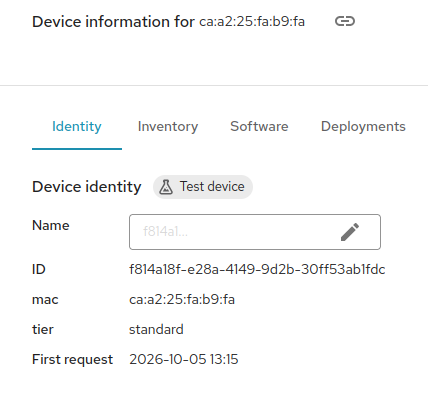
Test devices are also marked with a Test device label next to Device identity in the device details.
Test device limits
- 10 test devices per tenant: The tenant limit for test devices cannot be changed. Once 10 devices are reached, the UI shows an error with a link to your current test devices; remove the designation from an existing test device to designate a new test device.
- 20 test device changes per day: Both designating a device as a test device and removing the designation count towards this limit. The limit cannot be changed. For example, if you remove a test device in order to designate a new test device, those actions will count as two changes (one removal, one new designation).
What you should do now
- Identify the devices used for iterative testing, demos, or CI/CD pipelines.
- Designate the devices as test devices with Device actions → Set as test device.
- For all other devices, check that the configured polling intervals are at or above the default intervals listed above to avoid being throttled for exceeding the limits later.
Test devices are available in hosted Mender as of October 6, 2026.
For more information: See Limits and Inventory: Test devices in the Mender documentation.
Share your feedback
Share your feedback about the new Mender updates and suggestions for future improvements in the Mender Hub General Discussions forum. If you encounter any issues with the new release, please report them in the Mender JIRA issue tracker with detailed reproduction steps and system information.
Recent articles

New in Mender: Zephyr 4.4 support and reliability improvements
Discover the latest Mender releases, featuring Zephyr 4.4 support, enhanced reliability, and crucial bug fixes for seamless OTA updates in IoT devices.

Simpler, more predictable device search in the Mender UI
The Mender UI now features a streamlined device search, focusing solely on the Device identity attribute for quicker, more accurate results. Learn more about this change.

Software update challenges: Top scenarios to avoid (Part 1)
Explore common challenges in OTA software updates for IoT devices and learn scenarios to avoid for efficient deployment and operational success.
Learn why leading companies choose Mender
Discover how Mender empowers both you and your customers with secure and reliable over-the-air updates for IoT devices. Focus on your product, and benefit from specialized OTA expertise and best practices.