Mender blog

In response to user feedback, the Search devices bar located at the top of the Mender UI now operates using a more focused behavior.
Historically, Search devices queried broad device data, which often returned unexpected matches. In practice, most people use it for one task: quickly finding a specific device. So we have refined it to do exactly that task.
What changed: Device identity attributes
Finding a device now matches against any Device identity attribute, the sets of key-value pairs used to uniquely identify a device. These are defined on the Mender Client like MAC address or serial number, and also includes the Name tag.
Finding a device:
- Matches "any" or specific identity attributes: By default, the search term is evaluated against all configured identity attributes. You can also select a single attribute for more specific, targeted results.
- Uses "Starts with" logic: The search term matches the beginning of the identity attribute value. Searching for
00:1areturns00:1a:2b:3c:4d:5e, but searching for3c:4ddoes not. - Is case-sensitive:
Kitchen-01andkitchen-01are treated as different values – keeping search fast, even across large fleets. - Is the same everywhere: The behavior is identical across all Mender plans, and open source.
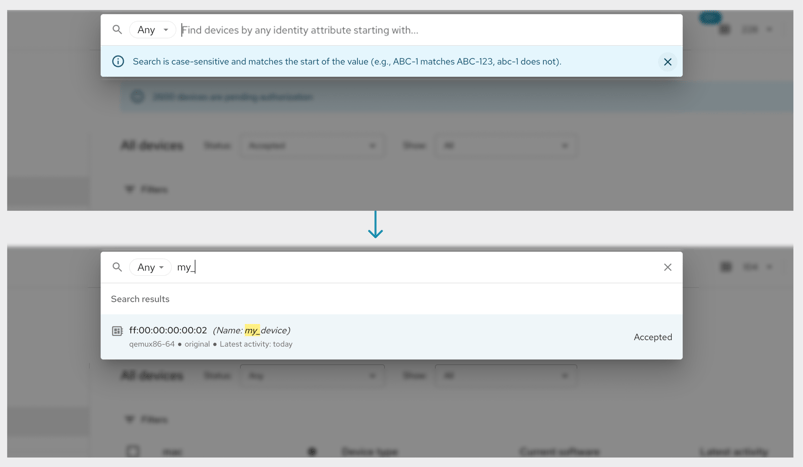
Available in hosted Mender as of October 15, 2026.
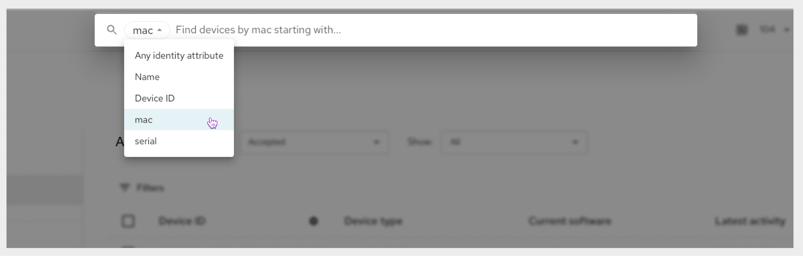
Selecting a single attribute for search
To find devices by one specific identity attribute, simply choose the attribute in the selector. This will not affect any other users' settings, or change the global Device identity attribute — it will only narrow down which attribute you are using to find a device.
Need more flexibility?
For advanced searches across inventory attributes and tags or to return multiple devices with shared attributes, use the filters on the Devices page. Filters allow more complex operators and the ability to combine multiple rules, for when you need to do more than just quickly find a device.
Share your feedback
Share your feedback about this release in the Mender Hub General Discussions forum. Your continued feedback ensures Mender keeps meeting your needs as we plan further improvements.
If you believe you have encountered a bug, please submit a report in the Mender JIRA issue tracker with detailed reproduction steps and configuration information.
Related articles
Official release: New component orchestration offers system-level software updates to multi-component products in Mender
Component orchestration is now available in Mender, enabling coordinated system-level software updates across multiple components, ensuring seamless and robust updates for connected products.

New in Mender: Significantly smaller delta updates, now for containers too
Discover Mender Client 6.1.0, featuring smaller delta updates for containers, multi-tenant flexibility, and optimized networking for improved IoT device management.

New in Mender: Test devices allow faster iteration, exempt standard polling rate limits
Mender introduces test devices, allowing faster updates and inventory polling for development. Designate devices now to prepare for upcoming rate limits.
Learn why leading companies choose Mender
Discover how Mender empowers both you and your customers with secure and reliable over-the-air updates for IoT devices. Focus on your product, and benefit from specialized OTA expertise and best practices.