Mender blog

The new release of hosted Mender includes the highly anticipated experimental AI-enabled feature.
Managing update failures in the real world
Seasoned users of device management solutions know that a lot of things can go wrong when you deploy a software update to a fleet of devices. Sometimes devices are not in the expected state, or the current device state is not identical to the test or QA environment. Some devices might successfully update, but others may not. Unexpected device states can cause dependency errors and permission issues, leading to a failed installation.
Network connectivity can vary, especially when it comes to the range of wireless networks, like cellular, WiFi, or satellite connections. Sometimes the network times out, resets, or simply aborts.
Or the device clock may be wrong, so the TLS certificate is rejected (even though it really is valid). If there is an end user with the device, they may simply interrupt the update, such as by turning the device off. Or, the device could run out of battery in the middle of the update.
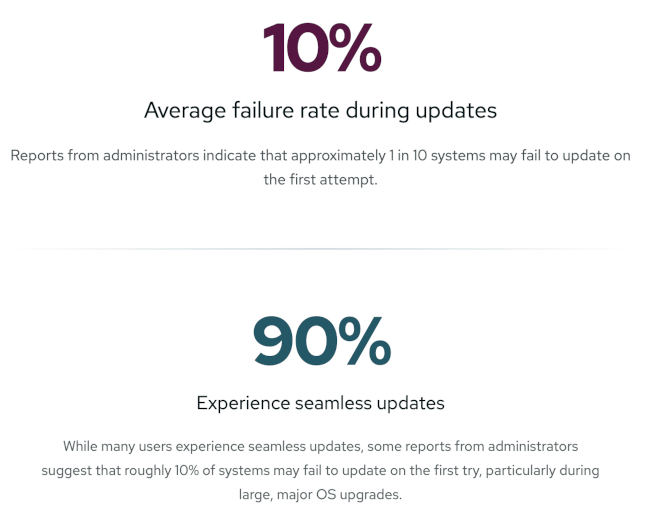
In the real world, software updates fail for a variety of reasons, despite proactive planning beforehand.
Robustness ensures device recovery
With this reality in mind, Mender is designed to be robust. By default, Mender takes a number of external factors into account, addressed by robust A/B image updates, retry, resume, hardware compatibility checks, post-OTA update connectivity verification, and much more.
When a device fails a deployment, Mender ensures that a full deployment log is sent back from the device to the Mender Server. With this detailed information, a Mender user can inspect the data, understand what happened, and make any necessary corrections to ensure the OTA update succeeds next time.
The challenge today is that error and log analysis can be quite time-consuming. Deployment logs can be hundreds of lines long, and machine output can be challenging to understand and remember. A successful analysis requires not only understanding what went wrong and why (the root cause), but also determining what to do about it (the resolution).
With all the different cases and devices out there, troubleshooting failed updates can become a significant time and resource drain.
Save time and effort with the new AI-enabled log analysis
Knowing the challenges users face with log analysis, the Mender team developed a new AI feature to make the failure analysis easier.
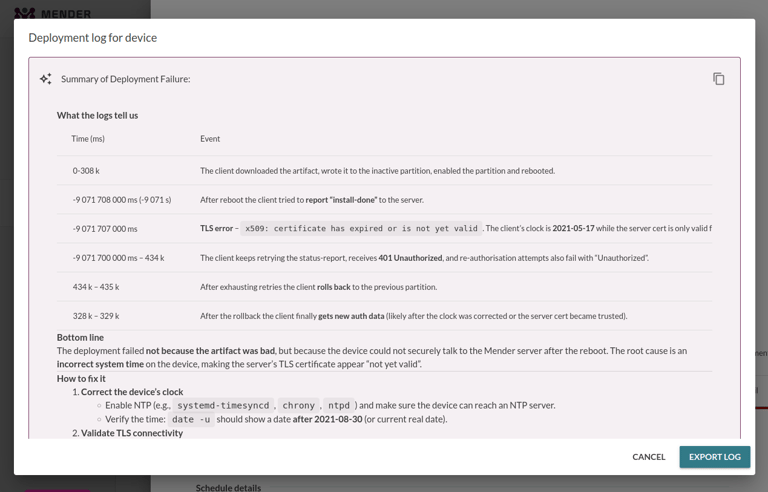
For a given deployment log, users can now use an LLM for analysis. The LLM will attempt to summarize:
1) Why the deployment failed (root cause), and
2) How to fix it (resolution).
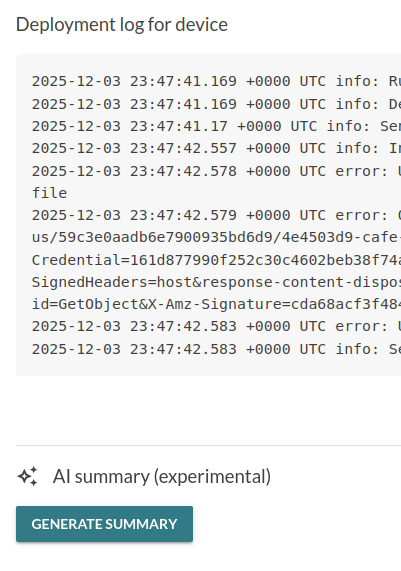
Here is an example analysis of a real failure. As is evident, the AI feature correctly identified that the failure was caused by an incorrect clock and recommends ways to correct it.
Try out Mender’s AI-enabled log analysis today
As a hosted Mender customer, enabling and testing the experimental AI feature is simple.
Enable AI in your Organization
First, AI needs to be enabled for your Organization. In the Enterprise plan, AI can only be enabled by a user with the Admin role.
If your Organization has the right permissions, click your user email in the top-right corner. Select Settings, and then click Global settings on the left side. Scroll down to toggle AI features (experimental) to on.
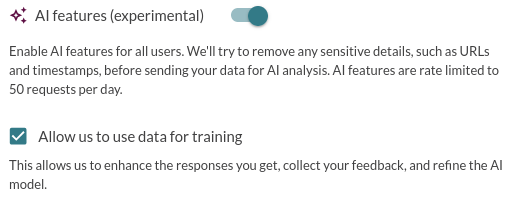
After enabling the AI feature, any user in the Organization can use AI to analyze a deployment log they have permission to access.
Analyze a deployment log
Click the Deployments tab on the left, and then, View details of a deployment with at least 1 failed device deployment (red exclamation mark), for example, under the Finished tab. Once you open a deployment with a failure, select View log. This should take you to the failed deployment log, which now has a Generate summary button.
AI security and privacy
In general, security and privacy are common concerns with AI. The Mender team designed and implemented this AI feature with these concerns in mind.
First of all, as mentioned above, no AI features can be used unless a user with Admin-level privileges explicitly enables AI for a given Organization.
There is an option to allow the Mender team to use your usage data for training purposes to improve Mender going forward and make this feature more generally available at a lower cost. This is optional. Simply decline, and your logs will not be reused for AI purposes.
The LLM used for the log analysis is hosted on Amazon Web Services, which is already a sub-processor used with hosted Mender.
Availability and feedback
Note: The AI feature is not available to trial accounts or on-premise deployments at this time. Only active hosted Mender customers can try the AI experimental feature. There is also currently a rate limit of 50 analyses per day per Organization.
For testing purposes, the AI feature is available as an experimental feature in hosted Mender Basic, Professional, and Enterprise plans at no additional charge. There are no guarantees that the AI feature will become an official and permanent feature, or that it will be commercially available in the future, including in what form and for which plans.
The future of the AI feature will be based on customer feedback. To quickly share your experience with AI-enabled log analysis, we encourage you to use the thumbs-up/down buttons at the bottom of each analysis.

Share your feedback
We hope these changes will simplify and help Mender users going forward. Share your feedback about the new Mender features and suggestions for future improvements in the Mender Hub General Discussions forum. If you encounter any issues with the new release, please report them in the Mender JIRA issue tracker with detailed reproduction steps and system information.
Recent articles

Managing software updates for the complete software-defined product
Explore the complexities of managing software updates for connected products, emphasizing the need for advanced strategies in today's diverse IoT landscape.
New in Mender: Significantly smaller delta updates, now for containers too
Discover Mender Client 6.1.0, featuring smaller delta updates for containers, multi-tenant flexibility, and optimized networking for improved IoT device management.

Building AI for the physical world:
Discover how to effectively manage edge AI deployment with robust lifecycle strategies, ensuring safety and compliance in the physical world of IoT.
Learn why leading companies choose Mender
Discover how Mender empowers both you and your customers with secure and reliable over-the-air updates for IoT devices. Focus on your product, and benefit from specialized OTA expertise and best practices.